
User manual
This video goes through everything in about 12 minutes. The rest of the manual covers the same in writing.
Getting started
Plug headphones or a speaker into the jack, plug ministar into USB and turn knob 1, the volume, up about halfway. Touch the keys to play. You don't need to press them.
It starts in D major. Your settings and loops are kept when you unplug it.
Controls
Keys 1 to 7, around the screen, play drums, chords or notes. Keys A to E, the small ones underneath, do something different in each instrument. Click the encoder and they become the looper controls instead.
The toggle picks the instrument: drums  on the left, chords
 in the middle, melody
 on the right.
Knob 1 is the volume. Knobs 2, 3 and 4 change the sound of the instrument you're on. The encoder changes the sound when you turn it, switches the small keys to the looper and back when you click it, and opens the menu when you hold it.
Each instrument remembers its own sound, knobs and level.
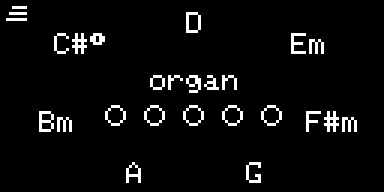
The screen shows what each key plays around the ring, the sound in the middle, and what the small keys do just below it. The icon in the top left corner is the instrument you're on.
Drums (toggle on the left)
Keys 1 to 7 are drum pads, and the screen shows which sound is on each one. They start as kick, snare, hat, open hat, clap, tom and cowbell from the 808 kit. Low tom, rim, shaker, clave and crash are also available.
The small keys:
- A
 loads a whole kit. The ring shows the seven kits: tap one to hear it, hold it for a second to keep it. Press A again to leave without changing anything.
- B
 edits one pad. Press B, tap a pad and turn the encoder to pick its sound. Click to pick which kit the sound comes from instead. Knobs 2, 3 and 4 set its tone, tuning and decay. Press B again when you're done.
Chords (toggle in the middle)
Each of keys 1 to 7 plays one of the seven chords in the key. Only one chord plays at a time: the last key you touched.
Hold a key and the one next to it clockwise to get a seventh chord. In D major, keys 1 and 2 together give Dmaj7. Keys 7 and 1 count as neighbours.
The small keys are a strumplate. Each one plucks a note of the last chord you played, or the one the loop is playing, from low to high.
Turn the encoder to change the sound: organ, pad, keys, synth, glass, guitar, vibes, harmonium, lo-fi, dream and brass.
Melody (toggle on the right)
Keys 1 to 7 play the notes of the scale.
The small keys:
- A
 moves one octave down, up to three.
- B
 moves one octave up, up to three. The octave is shown in the top right corner.
- C
 is hold: notes keep ringing after you let go, until you press C again.
- D
 is mono: one note at a time.
- E
 is double: every note also plays an octave higher.
C, D and E light up while they're on.
Turn the encoder to change the sound: marimba, flute, bell, pluck and lead, then the 128 General MIDI instruments played with FM synthesis.
Knobs
Knobs 2, 3 and 4 do something different in each instrument.
On the drums, space adds reverb and spreads the kit out, move sweeps a filter in time with the loop (off in the middle), and pump makes the kick push the chords and melody down.
On the chords, voice moves the chord lower or higher, shape goes from short stabs to slow swells, and roll strums the notes one after another.
On the melody, tone makes it darker or brighter, glide slides from one note to the next, and wide sends each note to the other side.
When you switch instruments, the knobs no longer point at the stored values. By default a value jumps to the knob as soon as you move it. If you'd rather it waited until the knob reaches it, set knobs to catch in the settings.
Looper
Click the encoder and the small keys become the looper:
- A
 opens the effects.
- B
 changes the length and tempo and opens the saved loops.
- C
 records.
- D

 plays and stops. Stopping always goes back to the start.
- E

 erases and undoes.
To record, press C and play. Recording starts with your first note. Press C again to close the loop, and it starts playing. Press C while it plays to add more on top, and C again to stop adding.
While you're adding, E removes the last pass, and you can keep pressing it to go further back. The rest of the time, E erases what the current instrument recorded. Hold E for a second to erase the whole loop.
All three instruments share the same loop. Record some drums, flip the toggle and add chords on top.
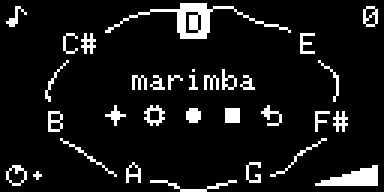
On the looper the encoder sets the level of the current instrument, shown in the bottom right corner. The circle in the bottom left shows where the loop is.
If you change the key, the loop changes with it. Chords and drums in the loop play with the preset and pads you have now, while the melody keeps the sound it was recorded with. A loop holds about 15 minutes of playing. The current loop is saved automatically and comes back, stopped, the next time you plug ministar in.
Grid loops and templates
For a loop with a set tempo and length, press D  before recording
anything. Keys 1 to 7 pick the length (1, 2, 3, 4, 6, 8 or 16 bars) and the encoder sets the tempo, from 40 to 200 BPM.
Press C for one bar of count-in, then play. The loop closes by itself. Press D to cancel.
Notes in these loops snap to 1/16 by default. You can change that in the settings.
The setup also has templates to start from. A picks a rhythm and
B a chord progression, on keys 1 to 7. They start playing as soon as
you pick them. Press C to record on top, or D to throw them away.
| Key | Rhythm (A) | Progression (B) |
|---|---|---|
| 1 | rock | I V vi IV |
| 2 | four floor | vi IV I V |
| 3 | hip-hop | IV V iii vi |
| 4 | breakbeat | I IV V IV |
| 5 | half-time | ii7 V7 Imaj7 |
| 6 | disco | I IV |
| 7 | funk | vi V IV V |
Length, tempo and banks
With a loop playing, press B . Hold one of keys 1 to 7 for a second to
change the length: longer repeats the loop, shorter cuts it. Turn the encoder to change the tempo.
From there, A  opens the banks. If there's no loop yet, B goes
straight to them. There are 5 banks on keys A to E, each with 7 slots on keys 1 to 7. Turn the encoder to choose save or
load, then hold a slot for a second. A saved loop keeps its key, chord preset, drum pads and levels. A loaded loop waits
until you press D.
Effects
On the looper, press A . Keys 1 to 7 become effects that work while you
hold them:
- 1
 stutter repeats a short slice.
- 2
 echo bounces between left and right and keeps ringing after you let go.
- 3
 reverse plays backwards.
- 4
 tape slows down to half speed.
- 5
 pitch jumps one or two octaves up.
- 6
 scratch goes back and forth like a record.
- 7
 wobble opens and closes a filter.
Echo, pitch and wobble can be combined with the others. Hold B, C or D as well to apply an effect only to the drums, chords or melody.
On this page knobs 2, 3 and 4 are sweep (a filter), crush and room (reverb). They stay on after you close the page, until you press E or unplug ministar.
Menu and settings
Hold the encoder to open the menu: play, settings and monitor. Touch the key next to one, or turn and click.
In the settings the small keys pick the tab, turning changes the value and clicking moves to the next line. Defaults are underlined.
| Tab | Setting | Options |
|---|---|---|
| A key | root | C to B, D |
| scale | major, minor, dorian, mixolydian, harmonic minor, lydian, spanish | |
| B loop | metronome | on, count-in, off |
| quantize | 1/16, 1/8, off | |
| overdub | count-in, now | |
| knobs | jump, catch | |
| C midi | a channel for drums, chords, strum and melody (1, 2, 3, 4) | |
| D display | brightness | 10 to 100%, 80% |
| sleep after | 30 s, 1 min, 2 min, 5 min, never | |
| screensaver | star, sky, warp, playfolk, off | |
| E info | firmware version | |
The monitor shows how much each key is being touched. It's useful if a key isn't responding or plays by itself.
MIDI
ministar shows up on a computer as a USB MIDI device, no drivers needed. Everything you hear is sent, the loop included, on the channels set in the settings. Velocity is always 100. Drum pads 1 to 7 send notes 36, 38, 42, 46, 39, 48 and 56.
The knobs send these control changes:
| Control | CC |
|---|---|
| volume | 7 |
| instrument level | 11 |
| knobs 2, 3, 4 | 20, 21, 22 |
| drum pad 1 to 7 tone, tune, decay | 23–29, 102–108, 109–115 |
| sweep, crush, room | 85, 86, 87 |
Troubleshooting
If there's no sound, check the volume knob and the instrument level on the looper. On the drums, a high pump setting can make the other instruments very quiet.
If everything sounds filtered or crunchy, the knobs on the effects page are still on. Open the effects page and press E.
If a key doesn't respond or plays by itself, look at it in the monitor. Keep your hands off the keys while plugging ministar in, since that's when they calibrate.
If a knob does nothing and knobs are set to catch, turn it past where the value is.
If the screen says full, the loop is out of space. Erase a layer.